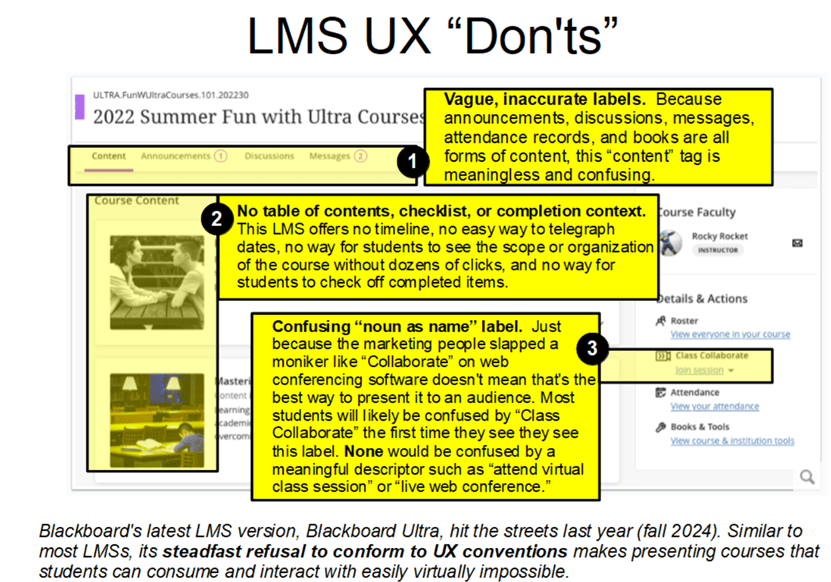
One of the most visible ways that online learning has differentiated itself as a discipline from every other form of online communication is the Learning Management System, or LMS.
An LMS is an application designed to provide grade reports, and only incidentally to drive the acquisition of knowledge or skills. You may have heard of quantum physics, in which the act of observation affects the thing being observed. In a way, LMSs are like that: their focus on reporting metrics changes the experience and makes the actual learning they’re reporting harder for students to achieve.
The problem with LMSs
All LMSs provide two interfaces, aka views: an instructor interface, and a student interface.
- Cumbersome instructor interface. LMS instructor interfaces are templates into which instructors or assistants, such as instructional designers, plug content and assessments to “create a course.” (Technically, they’re not creating a course, but readying a course for delivery.) Because LMSs weren’t developed with the instructors in mind, after a course has been “created” in an LMS, prior to each subsequent delivery—for example, at the beginning of each semester—instructors must spend hours clicking and updating cohort-specific details such as dates and minor content changes.
- Ineffective student interface. The course templates that LMSs provide (and that instructors are allowed to customize slightly but not change significantly or replace) follow few usability conventions. The result is a confusing “where am I and what do I click to get to what I need to do” student-facing course interface characterized by a deep information architecture (aka “rabbit holes” that require students to click lengthy breadcrumbs to find specific resources). In fact, LMS student interfaces are so consistently confusing and difficult to navigate that there’s actually a brisk aftermarket in how-to materials designed to teach students how to use their particular LMS. You read that correctly: there’s a need to teach students how to access course materials in an LMS because reading onscreen labels/cues and applying what students already know about online navigation simply doesn’t work with LMSs.
The instructional cost of using an LMS to deliver instruction
Having to explain how to use an interface, of course, is the very definition of a poorly designed interface. And hiding course content behind poorly labeled click strings degrades learning outcomes by:
- Wasting time that students could be spending on learning
- Reducing student motivation
- Interfering with student concentration
- Contributing to students missing content and assignment deadlines
- Modeling poor usability
How to remediate the LMS experience
Unfortunately, LMSs aren’t likely to change or disappear soon. If your project must be delivered via LMS and your goal is to drive meaningful learning outcomes, you can remediate the effects of LMS delivery by applying the following strategies.
- Be aware of the issue. Educate yourself on UI and UX conventions; then notice how few your LMS supports. This step is often necessary because it prepares you to justify the time you’ll spend in remediation to administration or management.
- Advocate for experimenting with non-LMS solutions. In cases where LMS-style reporting isn’t absolutely mandatory, consider distributing instructional materials as a collection of files stored in an intranet directory (such as Microsoft SharePoint) or though a third-party interactive server (such as Articulate Review 360).
- Deliver as much of your instruction as possible outside the restrictions of your LMS, reserving the LMS for assessment tracking only. At the very least, provide students a downloadable schedule via email or internet/intranet URL containing a numbered list of specific tasks (what students should read, watch, and do) accompanied by due dates. This way, at least they’ll know what they have to go hunting on the LMS to find (and how long they have to find it).
Consider using the LMS as a course wrapper. Provide a single link from your LMS to course materials designed and developed with usability in mind, and use the LMS only for inputting grades (to enable that all-important assessment reporting).
What’s YOUR take?
Do you deliver instruction via LMS? To what extent does it affect learning outcomes (and how do you know this)? Do you provide a custom “overview” video that walks students through how to navigate the course materials? Or have you found another way to make the LMS as transparent as possible so students can focus on learning? Please consider leaving a comment and sharing your hard-won experience with the learning community.
 Moore Thinking
Leave a comment