All blog posts ……..Start each work week with the latest issue. Scroll down to subscribe!
Top 4 reasons software training fails
Despite the perennial push for “intuitive” software interfaces and the brisk aftermarket in software how-to courses and books, it’s common for corporate IDs to be asked to create instruction that trains learners on how to use a specific software application.
Why?
- Few commercial software applications ship with usable documentation or tutorials.
- Third-party documentation and training materials are often too general to be of real value. If they’re specific enough to be relevant, they’re often out of date, always lagging behind the latest software version.
- Many organizations either create in-house systems or customize off-the-shelf systems to the point where in-house developed training materials are the only option.
Because training software is hardly uncharted territory, it might seem as though it’s a “no-brainer” — the type of project that’s easy, straightforward, and generally successful.
If only that were the case!
Too often, software training fails. And when it does, it’s virtually always due to one or more of the following.
1. A focus on the software interface.
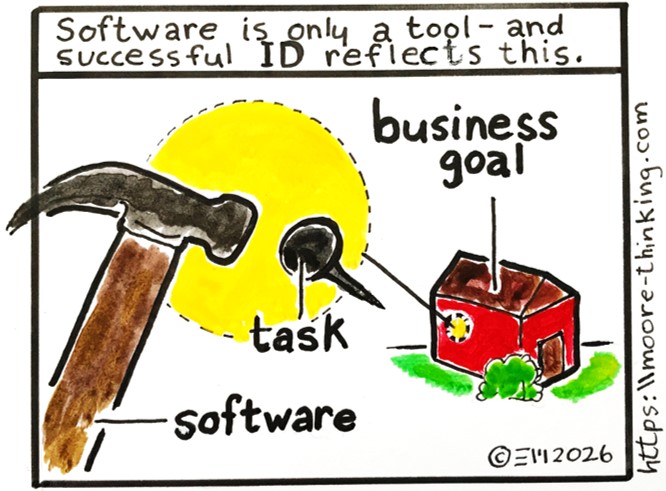
Focusing on what the software “lets you do” (vs. leading with the business tasks audiences need to accomplish using the software) is easy, common, and virtually guarantees poor outcomes.
If we design from the perspective of audiences who need to perform specific tasks that just happen to involve software, on the other hand, we’re setting ourselves up for success.
2. A lack of sufficient authentic practice.
Working through one or two partial, contrived examples isn’t sufficient to drive understanding, familiarity, or recall. Watching a video, taking a quiz, or completing a couple of scenarios isn’t sufficient. Learners need to hammer away on the software; that is, they need to use the software to complete a significant percent of the actual tasks they’ll need to complete on the job. And they need to complete each task several times, using different data and different conditions (including failure conditions).
Unfortunately, sufficient practice requires either:
- A test system accompanied by a representative set of refreshable test cases (a luxury not available in many corporate settings), or
- Interactivities mocked up using applications such as Figma or Articulate Storyline. This approach is enormously time-consuming, both in terms of creation and maintenance.
3. A lack of high-quality documentation to support learners in the field post-training.
No training can drive long-term recall of multiple, disparate multi-step processes. The best that software training can do is familiarize learners with a software application and provide enough practice to ensure learners exit training:
- Able to complete a handful of simple tasks using the software
- Able to look up instructions, in the form of reference documentation, for completing additional tasks (tasks that are complicated, nuanced, or that don’t come up very often)
High-quality reference documentation is organized not by the software’s menus and features (in other words, not from the software vendor’s perspective) but by the categories of tasks the audience needs to accomplish using the software.
4. A lack of effective visuals.
Software interfaces are image-rich, and it’s impossible to communicate image-rich information meaningfully without using visuals. In the case of software training materials, these visuals must take the form of annotated screenshots and annotated video walk-throughs. Both of these can be time-intensive to produce and maintain, but they’re absolutely necessary to drive results in the field.
The bottom line (TLDR)
When we’re asked to train learners how to use a specific software application, what we’re really being asked to do is train learners how to perform useful business tasks using that software application.
Keeping this perspective in mind can help us remember to incorporate effective visuals (in the form of annotated screenshots and video walk-throughs), sufficient authentic practice, and high-quality reference documentation—all of which are necessary to drive return on investment.
What’s YOUR take?
Do you have a different point of view? Something to add? A request for an article on a different topic? Please considering sharing your thoughts, questions, or suggestions for future blog articles in the comment box below.
 Moore Thinking
Leave a comment