Every discipline has its own specialized terminology. This specialized terminology serves two important functions:
- It’s necessary to describe domain- and practitioner-specific concepts.
- It serves to unite practitioners (in part by bewildering or even intimidating those outside the discipline).
Sometimes, as in the case of much of the terminology that surrounds the education and training fields, specialized vocabulary is unnecessarily arcane. This is a problem for three reasons:
- The first task of educators, trainers, and their support teams—including instructional designers and curriculum writers—is to communicate clearly! Perpetuating vague, overly complicated vocabulary is antithetical to our core purpose as communicators.
- Unnecessarily vague terminology makes training newcomers to the field more difficult (and may turn some promising newcomers off the field altogether, if they perceive that it’s “too hard.”)
- If we, as practitioners, don’t clearly understand what we’re talking about, we can’t possibly leverage it effectively in the field.
So, with a nod to Ambrose Bierce (whose famous Devil’s Dictionary provided tongue-in-cheek definitions for words and phrases common a hundred years ago), here’s a brief, commonsense Edspeak Dictionary excerpt targeted for new instructional designers, folks considering getting into the field, and seasoned veterans who always wondered if their understanding of key instructional design phrases was accurate.
Edspeak Dictionary (excerpt)
ADDIE — a design/development model developed for the production of hardware that doesn’t work for printed or digital materials but that is often touted as an ID job requirement anyway. ADDIE, which stands for Analysis, Design, Development, Implementation, and Evaluation, does indeed list the phases that ID materials go through from ideation to the field—but virtually no ID shops use ADDIE. That’s because, while it made perfect sense for the production of physical objects and the one-time-through development process that expensive tooling and manufacturing require, ADDIE doesn’t make sense at all for the production of easily altered words or bytes. Instead, virtually all IDs use an iterative model adapted from the worlds of publishing and software such as rapid, agile, or SAM (Successive Approximation Model), all of which incorporate those ADDIE phases into the context of successive, stakeholder-approved drafts beginning with a prototype/proof of concept/wire frame and ending with an evaluated production version.
assessments, formative and summative —The purpose of formative assessments, which measure bite-sized chunks of knowledge or skills, is to prevent learner overwhelm. Formative assessments allow learners to focus on mastering one or two concepts or tasks at a time. Summative assessments “put it all together” to measure the “end game.”
- In EDUCATION, the classic examples of formative and summative assessments are quizzes and homework (formative assessments) and a final exam or final project (summative assessment).
- In TRAINING, formative assessments typically take the form of knowledge checks and discrete skills assessments that require learners to demonstrate proficiency in just one or two steps of a process. Summative assessments take the form of requiring learners to demonstrate proficiency in performing an entire process from beginning to end in a real-life, authentic environment.
cognitive, affective, and psychomotor domains — mind, spirit, and body, respectively. (Also known in some circles as head, heart, and hands). A recognition of the classical understanding that to be effective, instruction requires learners to KNOW what to do; to WANT to do it; and to BE ABLE to do it. The implication for instructional designers is that facts and concepts (cognitive domain) aren’t enough. We also need to try to motivate audiences, usually by explaining “what’s in it” for learners (affective domain). And if we’re training skills, demonstrations aren’t enough; we need to provide authentic practice (psychomotor domain) accompanied by nuanced feedback.
engagement — the amount of time learners spend with materials, and their enthusiasm while doing so. Appealing, nutritive, straightforward materials can help increase the amount of time learners spend interacting with them. The more time learners spend engaging (interacting) with materials, the more likely they are to master the concepts and skills presented in the materials. Note that engagement neither guarantees nor measures mastery of knowledge/skills. Also note that attempting to drive engagement with poor-quality instructional materials does no one any favors.
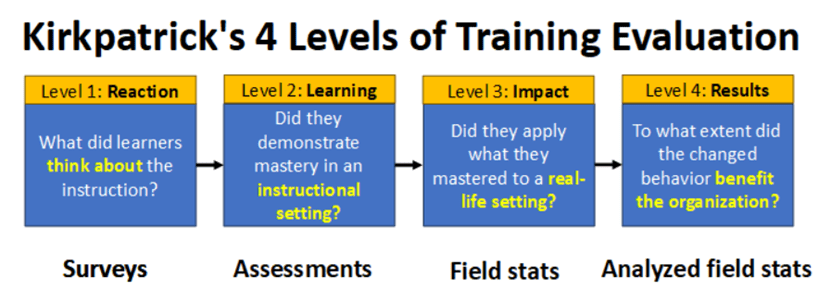
Kirkpatrick’s — a 4-phase approach to determining whether a given training was useful and, if so, to what extent in hard, cold cash (see Figure 1 below). Most instructional design includes surveys and assessments (Kirkpatrick’s levels 1 and 2). Unfortunately, neither Level 1 nor Level 2 tells us anything at all about what’s really important, which is whether learners are applying skills post-training to their actual jobs (Level 3) and, if so, whether that change in behavior is affecting the organization’s bottom line (Level 4). The reason few organizations pursue Kirkpatrick’s Levels 3 and 4 is because doing so requires a lot of thought and, in some cases, requires the analysis of data the organization isn’t capturing (or, more likely, is capturing but can’t identify, isolate, or analyze meaningfully).
SCORM — a data transfer standard that allows communication between an e-learning module and an LMS. In practical terms, SCORM is required to communicate learners’ assessment scores on a given e-learning module to an LMS for tracking and reporting purposes. Instructional designers don’t need to know SCORM details; all we need to know about SCORM is that most e-learning development software supports it, and so do most LMSs.
The bottom line
While building effective instructional materials based on education and training concepts can be challenging, understanding those concepts shouldn’t be! If you ever find yourself in a situation (such as a degree program, conference session, or interview) where instructional theory and vocabulary are discussed in vague, fuzzy terms that you don’t understand, don’t be intimidated. Instead, ask for real-world descriptions and examples. Doing so advocates for learners, and for our industry.
What’s YOUR take?
Do you have a different take on any of these definitions? Or is there another instruction-related term you’ve never be quite clear on? Leave it in the comment box below!
6 responses to “Edspeak dictionary: What ID terms actually mean”
-
Great post! I recently created an online dictionary for my colleagues, as many were quite new to ID work. It started with just a few items and went wild as I kept finding terminology that had conflicting definitions. Happy to share with you if you’d like a look.
LikeLike
-
Absolutely! Would love to see it!
LikeLike
-
Thank you so much for sharing this post in r/instructionaldesign today. You inspired me to post there for the first time. This is what I shared: https://car-lee-emm.github.io/L_and_D_dictionary/
It’s an evolving project. Let me know if you think I’ve got anything wrong! 😊
LikeLike
-
This is a great start and represents a ton of work! Kudos to you. 🙂
I didn’t spot any inaccuracies, but it’s impossible for me to identify anything “wrong” without knowing your intended audience and what you want them to get out of it. Is your primary target audience students, or businesspeople, or new IDs, or professional IDs, or…? Each of these audiences might benefit from a different spin on the definition (similar to the old story about the blind men and the elephant). Thanks so much for sharing this!LikeLike
-
Basically I’ve been doing this work for 15 years and my colleagues are mostly newbies in the ID field. We had a lot of miscommunication due to having different understanding of concepts and resources. I started with the blended vs hybrid as they were all using those interchangeably. It snowballed.
We are currently procuring a new LMS so it was vital we were all on the same page.
LikeLike
-
A team glossary sounds like just what the doctor ordered! Collapsing the structure (moving the definitions onto the same page as the terms so readers don’t have to click) would make the content quicker to consume, allow easy searching (via Ctrl + “f”), and also allow readers to compare/contrast definitions (which they can’t do when definitions are hidden behind tiles). But if you have a small group who’s comfortable with the layout as-is, adding that level of UX refinement might not be necessary. Thanks again for sharing this. It’s a good idea and will help support newly hired IDs as they’re added to your organization.
LikeLike
-
-


 Moore Thinking
Leave a comment